
On this page
- Step 1 - open Outlook on your mobile phone
- Step 2 - Enter your email address and select Continue.
- Step 3 - Enter your email account password and tap Sign In.
- Step 4 - two factor authentication (only when prompted)
This guide takes you step-by-step through
the prices of setting up a new email
account in Outlook on your Apple smartphone.
Step 1 - open Outlook on your mobile phone
If it's your first time using Outlook for iOS,
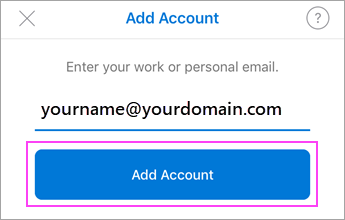
- enter your full email address, then tap Add Account.
- If not, open the Menu > tap Settings
 > Add Account >Add Email Account.
Step 2 - Enter your email address and select Continue.
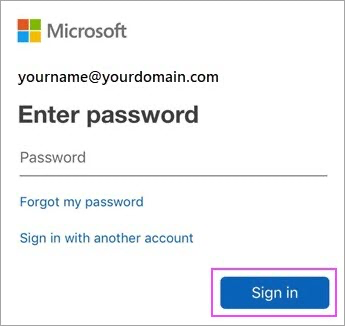
Step 3 - Enter your email account password and tap Sign In.
Step 4 - two factor authentication (only when prompted)
If multi-factor authentication is enabled, you will see the following
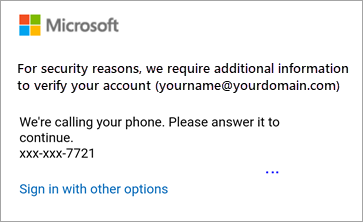
Enter your cellphone number and it will send you a OTP via SMS.