
After installing the Windows 11 22H2 update, you may notice that the “Browse for Folder” dialog invoked from various apps may show only the folders on the desktop. In other words, the desktop is shown as the rooted view, and no option exists to choose any other folder outside the desktop.
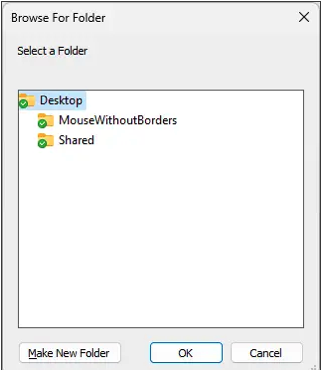
Cause
This is caused by a bug in 22H2 (windows.fileexplorer.common.dll) or the OneDrive sync client. As of the Windows 11 22H2 build 10.0.22621.900, this bug hasn’t been resolved.
Workaround
Disable OneDrive sync for the desktop folder
The workaround is to stop syncing your Desktop folder with OneDrive. You can have syncing enabled for the other shell folders, though.
Note: Before proceeding, copy the files in those special folders to another folder or external drive. Please don’t copy them anywhere under Desktop/Documents/Pictures. This is because disabling OneDrive backup for a folder erases the local copies of the files. Copying them to a different location beforehand will ensure that you don’t need to download them again from the OneDrive cloud.
- Right-click the OneDrive icon in the Notification area and click Settings.
- Select the Backup tab, and click Manage Backup
- In the Manage folder backup dialog, click on the “Stop backup” link for “Desktop.”
- Click Stop backup in the confirmation dialog that appears.
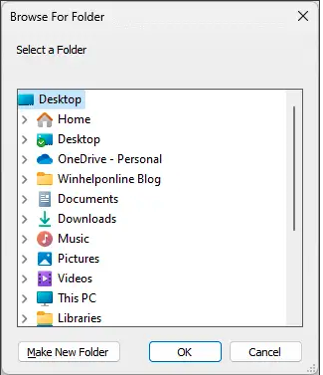
The Browse For Folder dialog should now populate the items correctly!
Option 2: Apply a registry fix
Update (Dec 2022): This option causes an annoying side-effect where the users will be unable to rename folders on the desktop after applying this fix. This has been reported by user “mowgus” from the Microsoft forums.
The trick is to replace the existing “ParentFolder” value data {5E6C858F-0E22-4760-9AFE-EA3317B67173} with %USERPROFILE% or {59031a47-3f72-44a7-89c5-5595fe6b30ee}.
Start the Registry Editor (regedit.exe)Go to the following branch:HKEY_LOCAL_MACHINE\SOFTWARE\Microsoft\Windows\CurrentVersion\Explorer\FolderDescriptions\{A52BBA46-E9E1-435f-B3D9-28DAA648C0F6}Double-click ParentFolder and set its data to:%USERPROFILE%Exit the Registry Editor.